
RISEx Public Testnet Guide

Today we're launching the RISEx public testnet.
RISEx is the first fully onchain realtime perps DEX, built on RISE Chain, secured by Ethereum. It runs a fully onchain orderbook with sub-3ms execution, tight spreads, and gas-sponsored trading through RISE Wallet.
Every perps DEX until now forced a choice: move matching offchain for speed, or stay onchain and live with the limitations. We didn't want to make that trade-off. So we didn't. Your entire portfolio can be margin: ETH, stables, LSTs, LP positions, vault shares. Positions can be tokenised ERC20s, composable with the rest of DeFi.
Here is a walkthrough!
Come Build on RISEx
First of all, come build! The first chapter of RISEx is just beginning, and we’re excited to open the doors to developers and early users from around the world. We’ve spent countless hours building RISEx but it will take you just minutes to connect your wallet and start trading on our network.
Powered by RISE Chain, users on RISEx get exclusive early access to the testnet. When you trade with the RISE Wallet, every transaction on RISEx is gas-sponsored by default. Our goal is to make the RISE experience completely seamless. One of the ways we achieve this is by covering gas fees for users, so newcomers can jump straight into onchain applications without worrying about managing gas.
Have an RISE Wallet Stack/EVM Wallet
First, make sure your wallet is installed in your browser. You can use any standard Web3 wallet. For this guide, we’ll use the RISE Wallet Stack, a native wallet layer designed for the entire RISE ecosystem with lightning-fast EVM connectivity.
We strongly recommend using the RISE Wallet to enjoy gas-sponsored transactions while trading. If you don’t have a RISE Wallet yet, learn more here.
Visit Testnet site: https://testnet.rise.trade/
Connect Your Wallet
- You can connect any Web3 wallet we support.
- Click RISE Wallet to connect to RISEx.
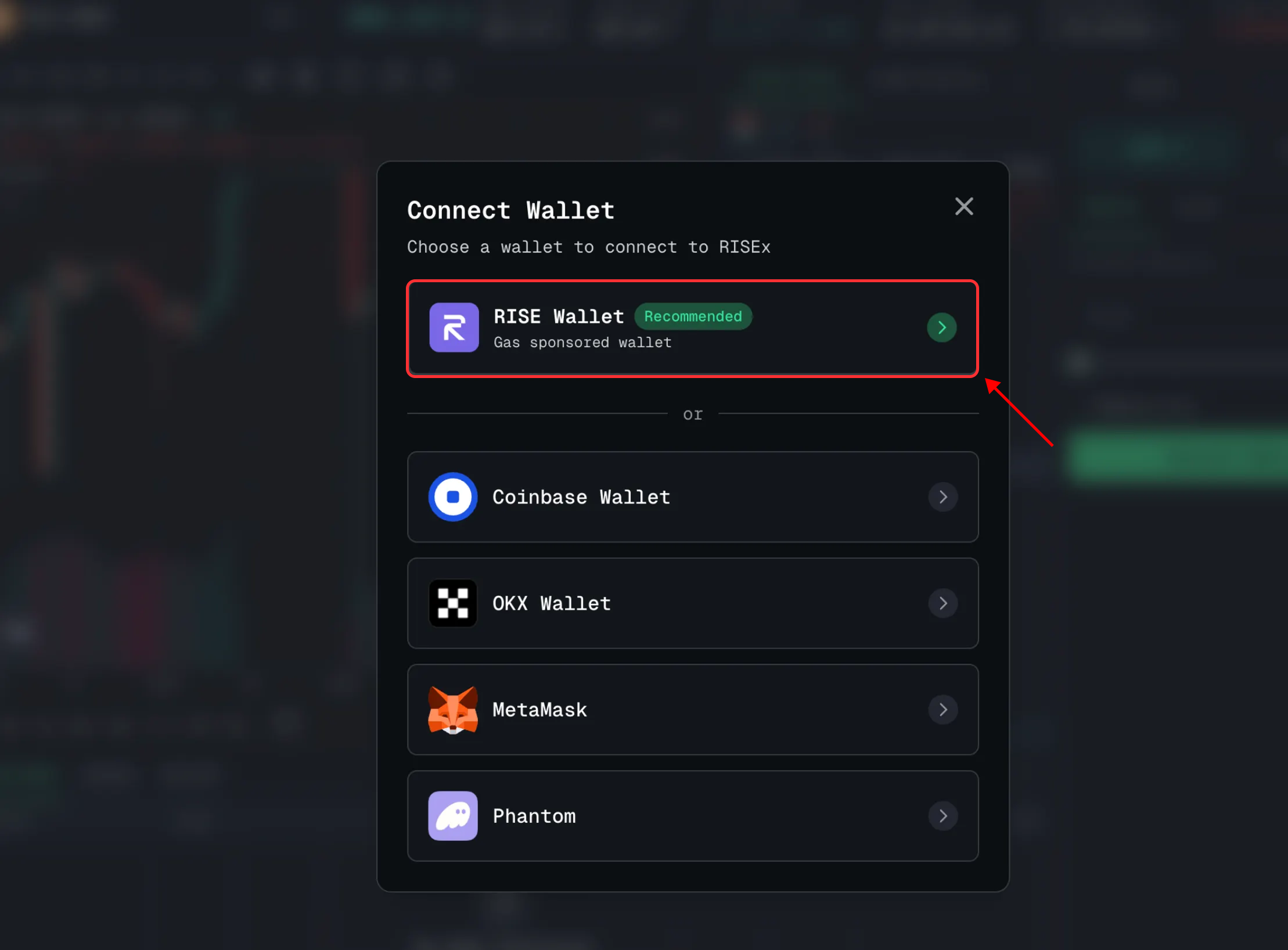
At this step, simply click to select the RISE Wallet.
- If you don’t have a RISE Wallet yet:
- Create a new one by selecting “Create RISE Wallet account”.
- You’ll be presented with several options for storing your passkey, choose the one you trust most to ensure maximum security.
- Set up a passkey to sign in to your RISE Wallet.
- If you already have a RISE Wallet:
- Simply click “Connect” → Continue with RISE Wallet.
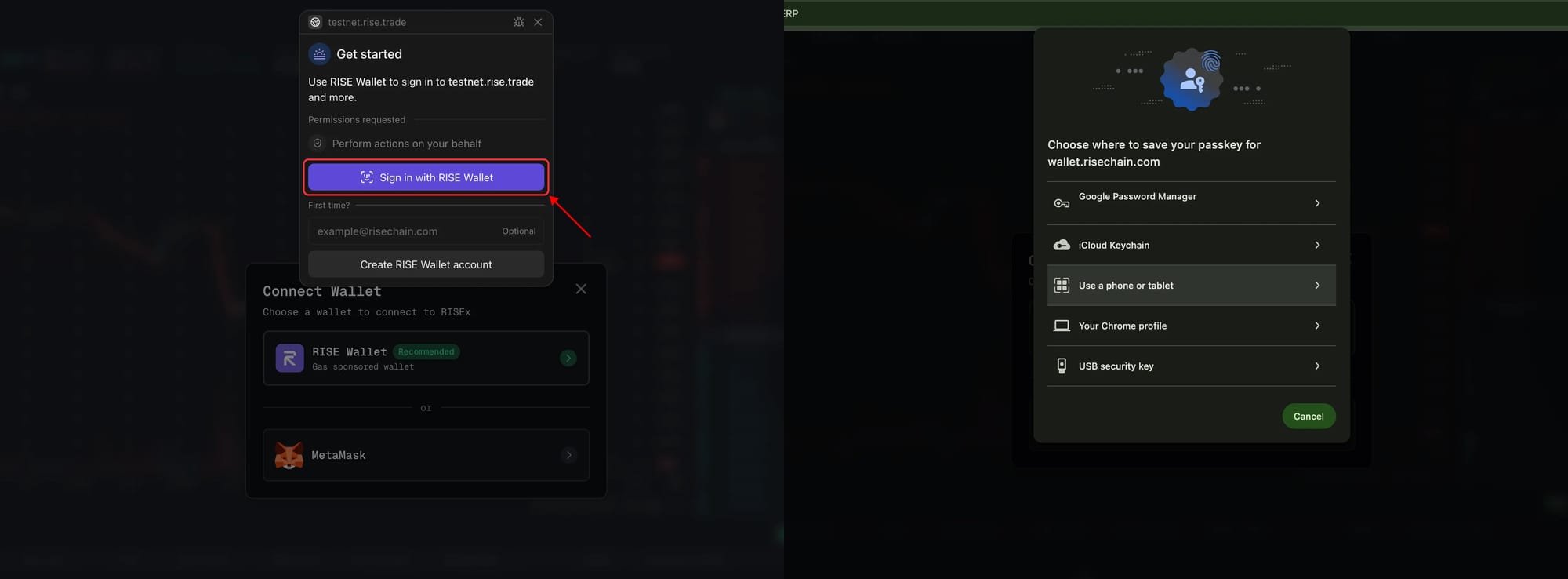
Once your wallet is successfully connected, the screen will update to reflect your account.
Claim Testnet Funds via Faucet
Navigate to Faucet here > “Claim 100 USDC”

Open Market Positions and Place Limit Orders
For this testnet phase, we’ve enabled trading for two assets: BTC and ETH, with a maximum leverage of 50x.
When placing orders, you can customize the following:
- Leverage slider from 10x to 50x.
- Margin mode (Cross Margin or Isolated Margin).
- Order type: Market or Limit. For limit orders, additional options include:
- Post Only: Ensures your order is added to the orderbook and won’t execute immediately as a taker.
- Reduce Only: Guarantees the order will only reduce an existing position and won’t open a new one.
- Easily adjust position size using the intuitive slider.
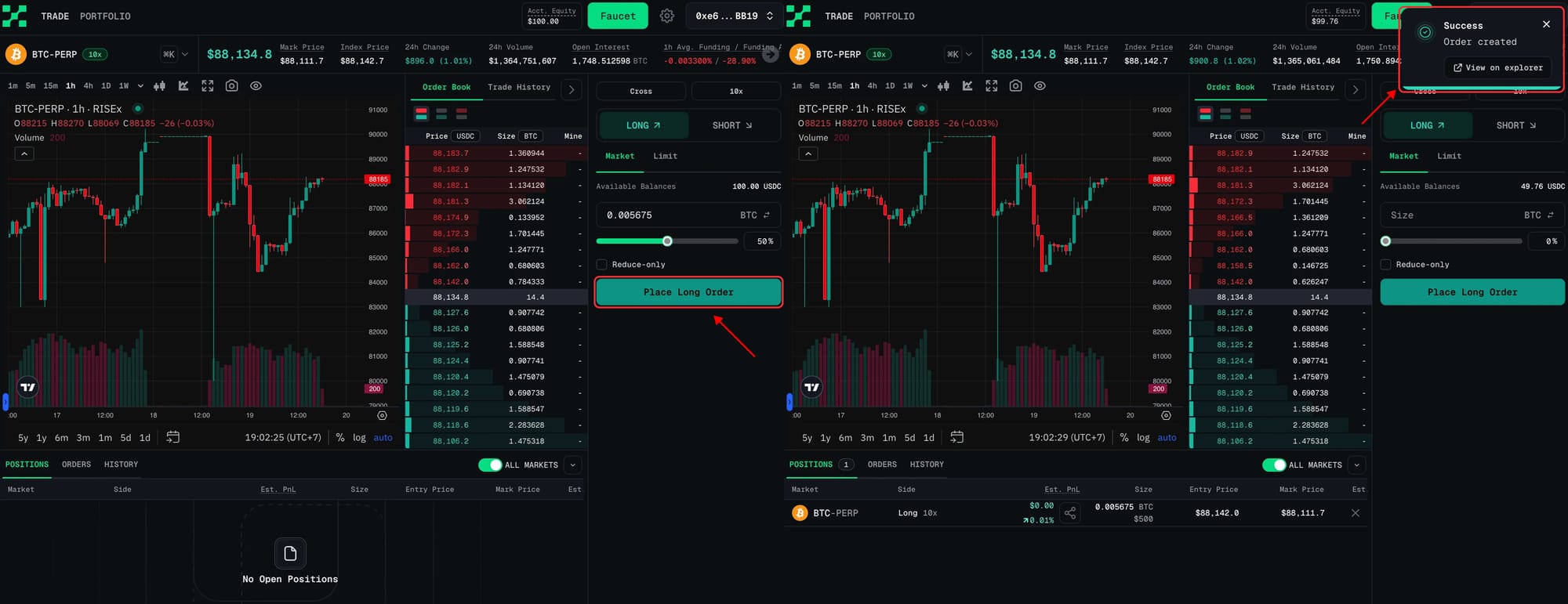
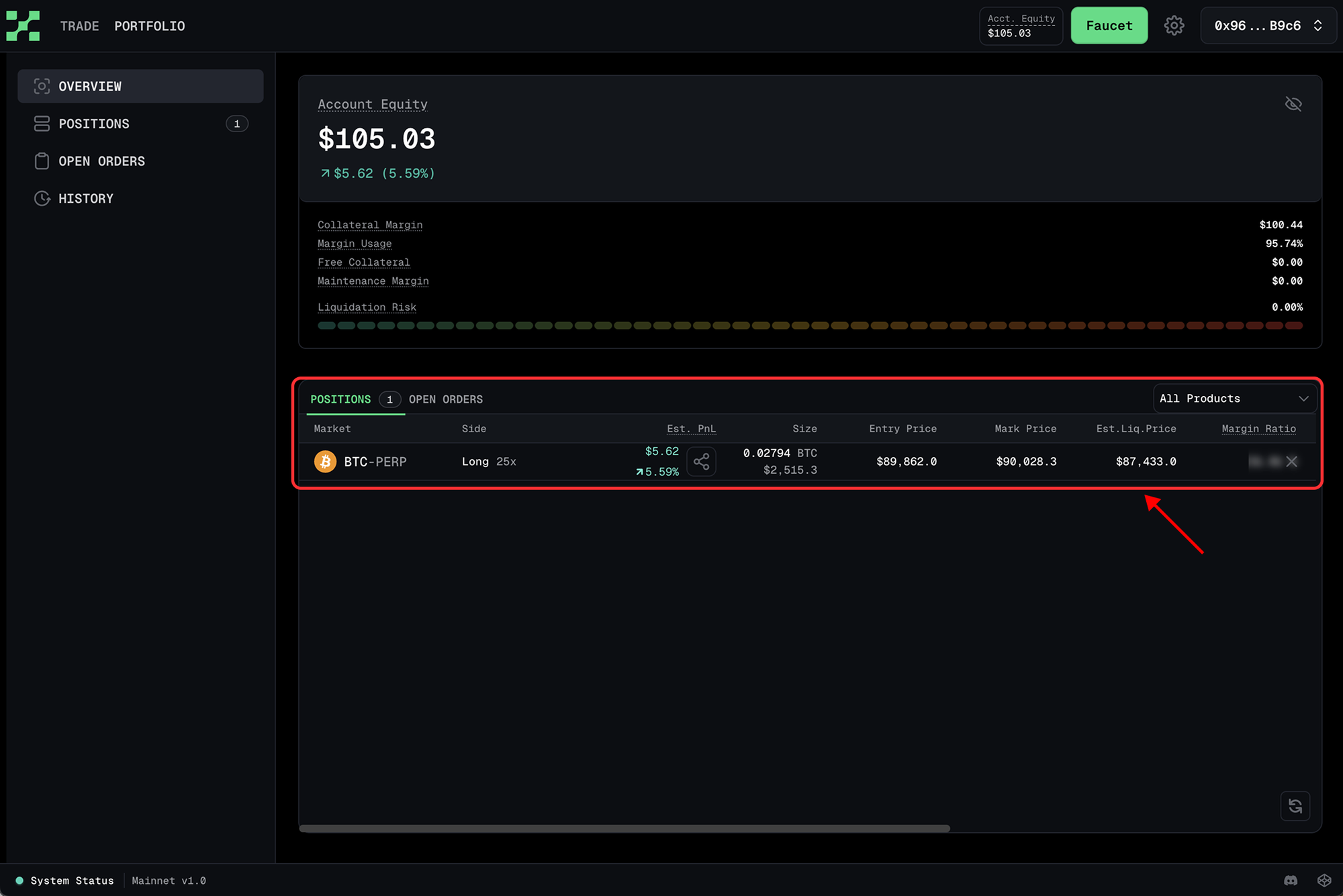
View Open Orders and Positions in the Portfolio Tab
To manage your balances and positions, head to the Portfolio section:
- Overview: Displays your account balance and overall position status.
- Positions: Detailed view of each open position.
- Open Orders: List of active pending orders.
- History: Record of past trades and executions.
You can also monitor your positions and orders directly from the main Trade page.
Closing a Position
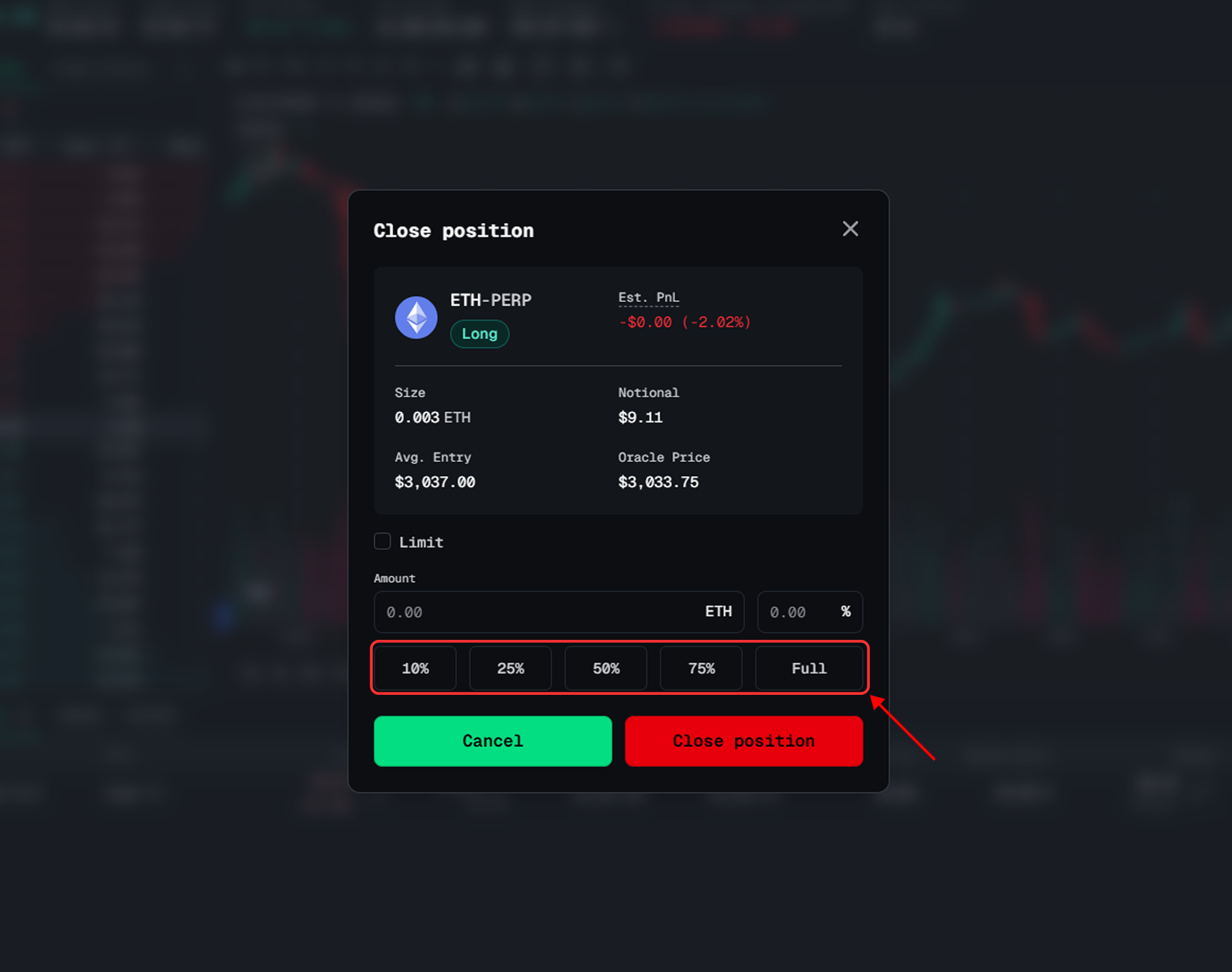
To close a position, click the “X” icon next to it. A Close Position popup will appear, allowing you to select the percentage to close: 10%, 25%, 50%, 75%, or 100% (full close).
Note: If you close a position while unrealized PnL is negative, that loss will be realized and deducted from your balance.

What’s Next?
You’re now successfully onboarded to RISEx. Feel free to trade daily on the testnet. We’re always eager to hear from the community, your feedback is invaluable during this phase.
💬 How to Share Feedback on Discord
We’d love to hear your thoughts as you explore the RISEx testnet. Sharing feedback is easy:
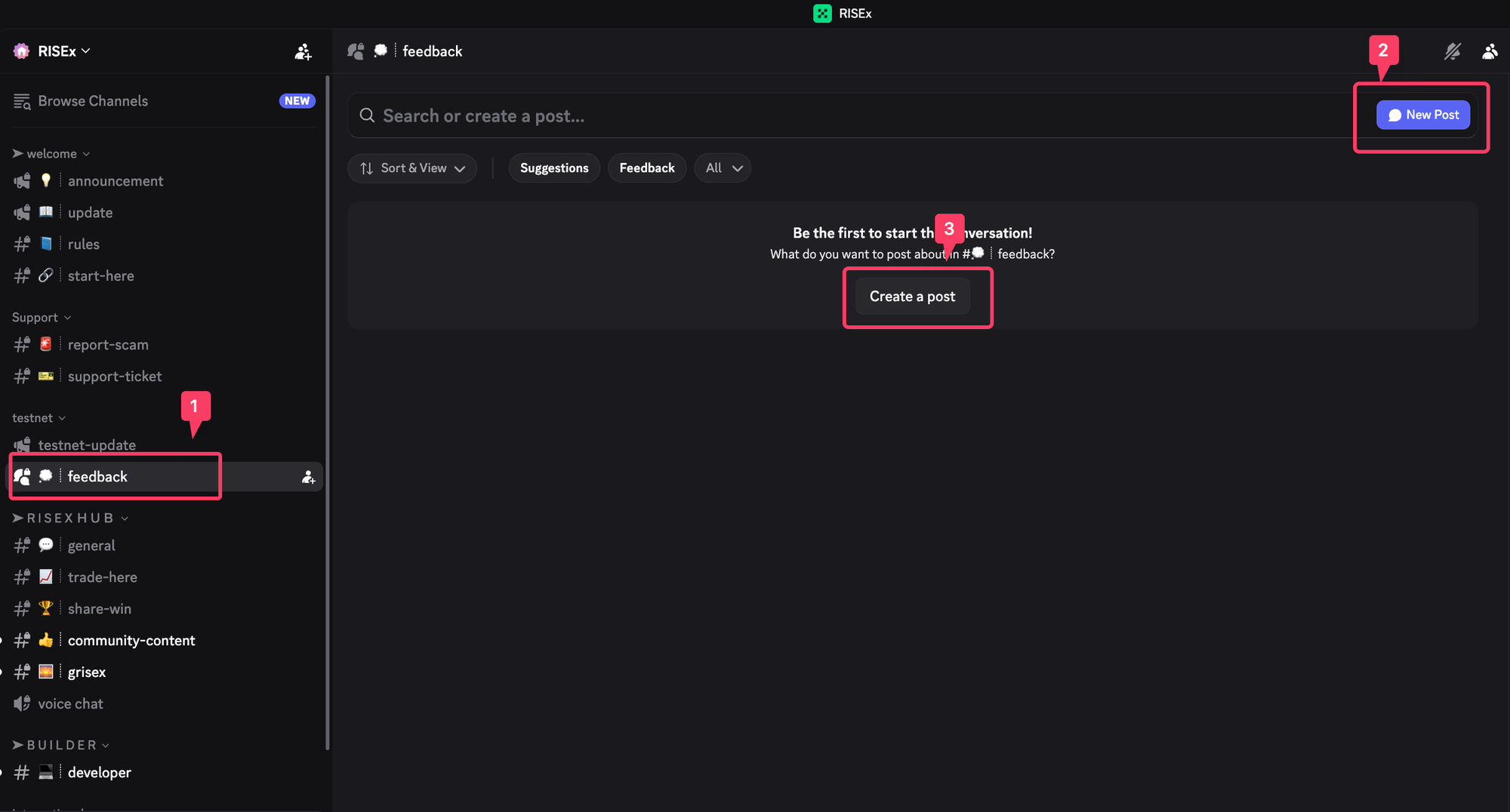
- Join our Discord
Head to the RISEx Discord and look for the#feedbackchannel under the Testnet section. - Open the feedback forum
Click on#feedbackin the left sidebar. - Create a new post
Click the “New Post” or “Create a post” button. - Share your experience
Describe what you tested, what worked well, and what could be improved.The more context you provide, the more helpful it is for the team.
If you need assistance or want to share thoughts, join our community channels. Follow us on X/Twitter to stay updated on the latest news.
- X: https://x.com/RISEx_trade
- Discord: https://t.co/xRrz20nSny
- Telegram (Announcement): https://t.me/risexannouncement
The RISEx Team